
The purpose of this blog post is to to provide some guidelines and the reasoning behind design decisions for the vSAN node hardware selection in a consolidated and concise form. Even though we will touch on vSAN Cluster sizing as it directly relates to selecting the proper storage devices, cluster sizing is beyond the scope of this post and there has been quite a bit of material written about the topic already.
Performance vs Capacity
One of the weaknesses of any open HCI solution is that is is near impossible to guarantee a specific configuration will provide X IOPS/Throughput. There are too many variables. Flakey drive firmware, network decisions and configuration, number and type of storage devices, workload variables, application variables. In order to maximize performance capabilities of our vSAN cluster, we want to focus on making the right decisions on hardware selection and configuration. This goes back to knowing your workload and making sure you have selected the right tool for the right workload.
Boot devices
We have to start with boot devices. Do not boot from USB devices in production ready deployments. I believe this blog is highly relevant and should stand on it’s own. Please read this if you have not already done so. M.2 SSD as Boot Device for vSAN

Consider these KB articles in support of the decision to use more durable media for boot.
- VMFS-L Locker partition corruption on SD cards in ESXi 7.0 (83376)
- Storing ESXi coredump and scratch partitions in vSAN (2074026)
- Redirecting system logs to a vSAN object causes an ESXi host lock up (2147541)
We also have this from the VMware ESXi Installation and Setup Guide.
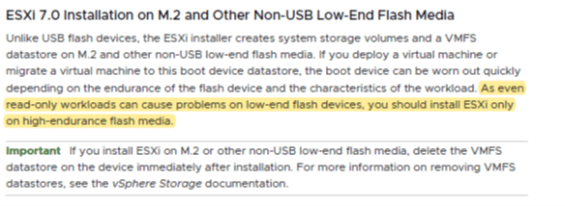
Disk Groups.
To understand drive selection decisions for vSAN, one should be aware of the disk architecture of vSAN. This is a refresher and not a deep dive on the subject.
The most basic construct of vSAN is the Disk Group (DG). A DG consists of one caching device, and between 1 and 7 capacity devices. A single node can have up to 5 DGs. The caching drive must be a flash device and should have high write endurance.
The capacity device could be spinning media or flash devices. This size and performance of capacity devices depends entirely on the workload that vSAN will support. (Assessing the workload was covered in part one of this series) Each ESXi node that is participating as a storage node in a vSAN cluster must have at least one DG. The capacity drives in a DG should be the same class and size across those DGs. It is a best practice to have a balanced solution, meaning all nodes have the same number of DGs, same quantity, size, and class of drive. All nodes should provide similar capacity and performance. This is not a hard requirement. Just a best practice. As of this writing we are seeing spinning media become used less frequently even in platforms that need to support lower performance requirements. We even see large scale-out storage solutions like Object Stores/S3, scale out NAS leverage flash more frequently.
Caching for vSAN has some limitations. vSAN will only utilize 600GB of a cache drive (as of this writing). Any excess space on the cache drive will be used by vSAN to increase the lifespan of the cache device. Cache devices directly impact the write performance in any vSAN cluster as 100% of writes are buffered by the cache device. Since we cannot increase the amount of usable cache in a single DG to more than 600GB, one can increase the amount of cache in vSAN node by adding disk groups and thus additional cache devices. In any production ready vSAN cluster, two DG’s is a starting point.
The total performance and capacity of a vSAN node can be grown by adding DG’s and/or capacity drives. If a vSAN node started out with two DG’s, each with an 800GB cache drive and two 3.84TB capacity devices, the node could be grown by adding drives to the existing DG or by adding another DG. Does it only need more space to handle increasing demand? Just add capacity drives. Need more performance too? Add another disk group for more performance and capacity. Since the maximum size of a vSAN cluster is 64 nodes, adding nodes to linearly increase storage capacity, performance, compute, and memory capabilities of the cluster is an easy option.
This is my opinion through observation: Three DGs seems to be the sweet spot for performance gains, capacity and managing growth effectively assuming the selected server chassis can handle that configuration. It’s simple to just add capacity drives for expansion and three disk groups provides a very good performance/capacity balance.
Storage Adapters
There is no need for RAID adapter functionality in vSAN as vSAN controls data placement and redundancy . There are some RAID adapters that are on the HCL but those are either setup for RAID-0 or as a passthrough devices. RAID devices bring no added value or functionality to vSAN.
vSAN typically uses a host bus adapter (HBA) for non-NVMe storage drives. Neither HBA’s nor RAID adapters should provide onboard cache. vSAN handles the write buffering and any caching processes.
NVMe devices do not requires HBAs which is one of the reasons, in addition to similar cost to SAS drives, that an ideal starting point is configuring a solution with all NVMe. Less complexity, fewer concerns with firmware and drivers and one less item to troubleshoot if (when) needed. As mentioned previously, workload is king and should dictate the appropriate design. However if the decision is between SAS and NVMe, my opinion is to start with NVMe.
While this is not a topic I see frequently, be aware, consider the impact of PCI switches and SAS expanders on density and supportability. Below is a link to a great post regarding the subject that also covers some potential scaling issues. The bottom line is that SAS Expanders are only supported on certain vSAN Ready Nodes
PCIe Switch and SAS Expander support for VMware vSAN ReadyNodes
Drive Interface and performance
When deciding on drive type, quantity, and configuration, it is important to understand the impact these decisions will have on your design. It’s not enough to just accept a design from a vendor or to just select a vSAN Ready node without understanding what the component selection means. Which drives will adequately support environment and why? How do we design the most cost-effective solution that will support the prescribed environment for now and scale to meet additional and potentially unforeseen challenges? Let’s get into the information that is the “why” behind drive selection.
*It is beyond the intended scope of this post, however if the various drive interfaces are not familiar, this article from TechTarget.com provides an overview of SATA vs SAS vs NVMe. NVMe Speeds Explained
This is a cost/capacity pyramid for storage device types pulled from one of the sizing and design guides on VMware’s vSAN section of TheCloud Platform Tech Zone
SATA
I’ve modified it a bit to reflect my opinion regarding appropriate drive selection.
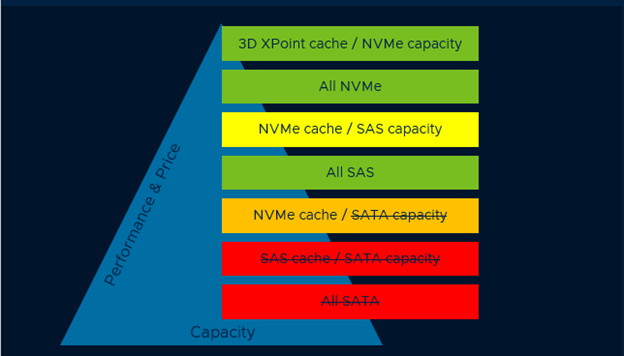
What do we see here? SATA is the slowest and lowest cost of SSD. In ascending order we have SAS, NVMe and Optane (NVMe interface). In a production environment with, what could be considered, typical performance requirements there is little room for SATA in my opinion. SATA is great for labs as the commercially available SATA devices are very low cost and an easy, cost effective replacement for spinning disk in environments where high performance is not a requirement. If the vSAN environment is going to support higher density environments like that of a service provider, that usually indicates higher performance requirements. It is my experience, that workload density and economies of scale are very important which eliminates SATA from the drive selection process in many cases. Designing and deploying an under performing solution can be quite costly to remediate. There is no 100% so I’ll say this again, workload is king. The appeal behind HCI is that is should be cost effective and simple to manage/operate so build what works for your environment.
SAS vs NVMe
The cost delta between NVMe NAND and SAS NAND storage devices has narrowed to a point where I’ve seen the cost become negligible in many. All SAS and all NVMe solutions with similar drives have shown to have a small cost delta and trending toward cost parity. NVMe should be the preferred interface.
How about a mix of NVMe as the cache device and SAS as capacity? I’ve seen limited performance increase when mixing NVMe NAND as cache device with SAS NAND capacity. The pricing has become similar so why mix? While there is not a significant level of performance increase by using NVMe NAND cache with SAS NAND capacity, 3D XPoint (NVMe) as a cache device with NAND capacity can provide enhanced performance.
This post: http://www.mrvsan.com/optane-performance/ does a nice job of highlighting the performance advantage of Optane as cache. Trend toward all NVMe if possible. Optane is becoming more common and can provide the highest level of performance and is an excellent choice for a cache device. Cost and size of available Optane devices may prevent Optane from being a good option for the vSAN capacity tier….for now.
Endurance
When selecting SSD, determine the proper balance between performance, endurance, and capacity. Drive Writes Per Day(DWPD) is something you must pay attention to or your design may see premature storage device failure. Vendors usually have their drive option categorized such as: Read Intensive, Mixed Use and Write Intensive. DWPD is a measurement of the number of times a drive can be overwritten during its warranty life. For example, if you have a 3.84TB drive with 5 year warranty a DWPD of 1, you could write the entire capacity of that drive one for 5 years.
Another method of measure is Terabytes Written (TBW) which is the total amount of data written to that device before it may need to be replaced. A 3.84TB read intensive drive may have a TBW of 7008 and a 5 year warranty. 7008/(5years x 365 Days x 3.84TB)=1DWPD.
- Read Intensive (RI) drives usually have a DWPD of 1 or less.
- Mixed Use (MU) drives usually have a DWPD of 1-10
- Write Intensive (WI)drives usually have a DWPS of 10 or greater.
Below is a graphic I created to compare the various drive classes (RI/MU/WI) for a random selection of SAS drives to emphasize the difference in the classes in regard to performance and longevity. This info can vary across vendors and drive manufacturers. As a point of interest, see the links to Dell and HPE docs for their classification. The point with this is to understand what to pay attention to and how it impacts the overall design.
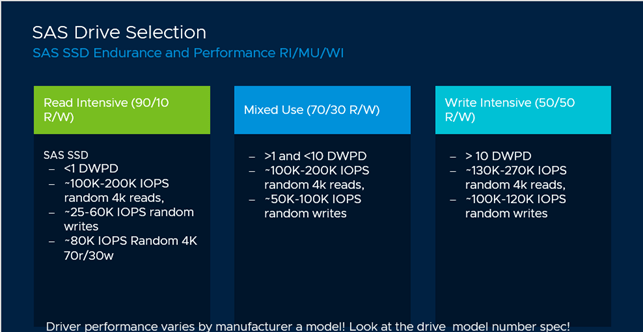
Below are a few vendors provided data sheets comparing performance and endurance of their drive offerings the info depicted in the previous image was derived form vendor provided info.
- PowerEdge SSD Performance Specifications
- HPE SSD Quickspec
- Dell PowerEdge Express Flash NVMe Performacne PCIe SSD
It’s probably not a surprise that with SSD, RI are typically the least costly $/GB, MU would be next in line and WI would be the most costly. Going back to workload assessment and understanding the workload is critical to selecting the proper drives. RI SSD is rarely appropriate as the cache device due to the endurance. However, Read Intensive drives are frequently used for capacity devices.
As an exercise, let’s say we have an assessment that shows 30TB written per day to an existing array that will be replaced by vSAN. This was measured at the hosts, not the array front end or back end ports. The 3.84TB drive used in the previous example had a DWPD of 1, Factor in RAID overhead (see below)
- RAID 1 FTT1-2x space consumption
- RAID 1 FTT2-3x space consumption
- RAID 1 FTT3-4x space consumption
- RAID 5 FTT1-1.33x space consumption
- RAID 6 FTT2-1.5x space consumption
This 30TB written is measured at the host so it does not include RAID overhead. The decision has been made to use RAID-6 for most of the workload.
30TB x 1.5 (RAID-6) space consumption= 45TB. 45TB/3.84TB = ~12 capacity drives to manage the daily writes without premature drive failure. With this, it’s easy to see why RI drives may be perfectly adequate for the vSAN Capacity Tier when considering the number of drives needed to support the workload and future growth considerations (This obviously ignores any performance requirements, rebuild or repair IO just to keep it simple. This configuration would not be an ideal choice to support that workload). Add in required vSAN overhead, snapshots, VM swap, immediate and near term growth needs and that 45TB for data may turn into 80TB-95TB, thus increasing the number of required drives and decreasing the likelihood of premature drive failure due to over writes. There are other factors to consider when planning sizing and drive selection but this was simple math to explain the concept of planning with consideration to drive endurance
Read this for more info on capacity planning for vSAN overhead: Planning Capacity in vSAN
Node size and failure domains
How much storage should a single node support? There is no “right” size for everyone. My first question would be “How many VMs do you expect to support on a single node?” How many VMs, and how much storage, compute, memory resources is your organization comfortable with losing in the event of an planned outage? I’ve always been more on the cautions side when planning because I don’t want enormous failure domains. Keep failure domains small and manageable where possible. Ask yourself, “How long would it take to repopulate a failed 15TB SSD or a 60TB node? Would it be better to have a DG consisting of 3x 3.84TB SSD or 1x 15TB?” I would lean toward higher quantity of smaller devices as it provided increased performance capabilities and smaller failure domains.
As an example; let’s say the vSAN design requirement is to support 1000VMs with a combined written capacity requirement of 500TB, and that the CPU and RAM requirements can be met with 10 nodes. In the event of a node failure, would your organization be comfortable with restarting 100VMs or having to recover rom the loss of a 50TB block storage capacity? Would that satisfy any Service Level Agreements? Are there resources available to restart those 100 VMs on the remaining nodes? There is an assumption here that HA Admission Control has to be addressed. How long would it take to repopulate that 60TB failed node on a busy cluster? Is this more difficult than planning a traditional storage solution? There are always trade-offs as we will review next.
vSAN Failure Domain vs traditional shared array
In vSAN, if a 10 node cluster lost a node, that is 10% capacity and cluster performance capability for CPU, Memory AND storage. Rebuild and recovery may take a relatively long time. It can impact performance but it is at a smaller scale (if we’ve made good decisions on our design). In most traditional shared storage arrays the loss of a node, planned or unplanned can result in the loss of 50% or more of performance capability. On a traditional two node array, the controllers mirror all cache writes to each other, acknowledge that write to the host and flush to disk (let’s ignore compaction efforts). If a node goes down, the ability to mirror to the other node in the pair is gone so in order to protect the data integrity, write buffering is typically turned off until the ability to mirror the cache is restored. So all write IO is sent direct to disk vs landing on a MUCH faster cache tier. One has to plan around that potential outage and the performance degradation associated with it. That means plan around performance degradation when upgrading, not just unexpected outage. Just like planning for capacity and performance when a vSAN node goes down, however the vSAN node going down has a lower potential impact since a single failure on that shared array now means that array is non redundant single point of failure until resolution. RAID levels don’t matter in that case. What about planning for a storage enclosure outage on an array? The enclosure is housing a couple dozed drives in many cases. It happens and should be a consideration when planning a storage solution with a traditional array. vSAN planning is more similar to planning for vSphere cluster node loss. I see this as a huge advantage. Planning N+1 or N+2 in regard to server nodes vs having to overbuy a traditional controller model array by 100% in regard to performance to make sure SLAs are met in the event of a failed node. Which has a larger financial impact?
Back to sizing, VMware provides a vSAN Ready Node Sizer that can get you in the ballpark for a configuration regarding node size and quantity. This is easily customizable and seen in these screenshots.
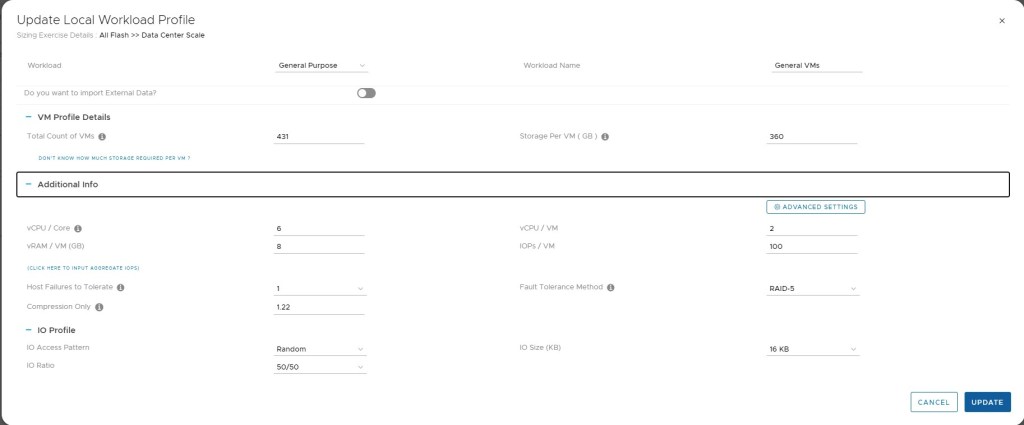
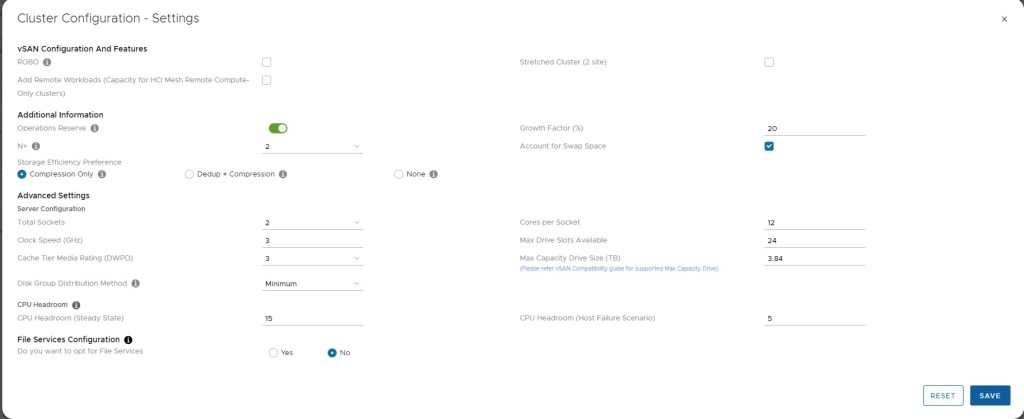
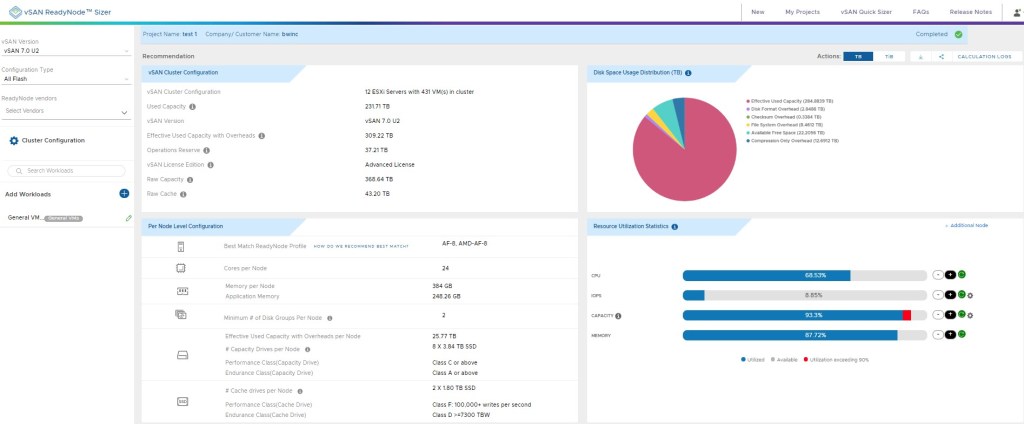
The vSAN Ready Node Sizer is fairly simple and straight forward and very useful for capacity planning. In my experience, this is a starting point with the customer/partner having different opinions on density, redundancy, failure domain size so these recommendations from the Sizer are manipulated to provide the preferred results. Have a solid understanding of maintenance operations when sizing that node by reviewing vSAN Operations Guide. As I’ve mentioned in other posts, run a POC to see how this works in your environment. Vendors are almost always willing to help with a PoC.
Summary
- As always #1 rule. If it’s not on the vSAN VCG, it’s not production ready
- Boot from a durable media, not USB
- Plan your Disk Group configuration with growth in mind
- Minimum of two Disk Groups for all but low performance or budgeting requirements. Three DG is better. Max is five
- Consider starting with all NVMe for performance sensitive or dense environments. NVMe is the future.
- Mixed Use or Write Intensive drives for the cache device.
- Optane as a cache device provides significant performance boost to a NAND capacity tier.
- Keep failure domains to a manageable size


 benwold.com